KEEP LEARNING
Build the bigger picture.
The Workflow Engineer connects individual n8n concepts to testing, deployment and running a complete workflow.
Showcase > Content & AI
28-node standalone n8n workflow using OpenAI, Qdrant, and Brave Search for RAG-powered YouTube scriptwriting.
This 28-node n8n workflow is a streamlined, standalone scriptwriting pipeline: it ingests your reference documents into a Qdrant vector store, then generates YouTube scripts from a topic using a RAG-augmented AI agent and Brave Search web research. Because it retrieves examples of your own best scripts, the output matches your voice and pacing rather than generic AI writing.
Note: Source Workflow
This is a simplified variant of the YouTube Scriptwriter workflow. No source JSON is available for independent verification. The details below are reconstructed from the workflow structure.
A streamlined standalone scriptwriting workflow that proves you do not need 200+ nodes to produce professional YouTube scripts. This is the distilled version of our larger scriptwriting systems -- a focused, independently deployable pipeline that takes a topic and reference materials, runs them through a RAG-augmented AI agent, and produces camera-ready scripts with consistent voice and tone. Built for creators who want professional output without enterprise complexity.
| Nodes | Category | Complexity | Key Integrations |
|---|---|---|---|
| 28 | Content Creation / AI | Intermediate | OpenAI, Qdrant, Brave Search, Google Sheets, Google Drive |
30-45 minutes including Qdrant setup, initial document ingestion, content queue spreadsheet creation, and credential configuration.
This workflow operates in two modes. The first mode is document ingestion: it reads reference materials from Google Drive -- past scripts, style guides, brand voice documents, competitor analyses -- splits them into chunks, generates embeddings, and stores them in a Qdrant vector database. This builds a persistent knowledge base that informs every script the system produces.
The second mode is script generation. Given a topic from Google Sheets, the AI agent retrieves relevant context from the Qdrant knowledge base, performs web research via Brave Search for current information, and generates a full YouTube script. The script follows the structure and voice patterns learned from the ingested reference materials, not generic AI writing patterns.
The "style library" concept is the differentiator. By ingesting your best-performing scripts as reference documents, the RAG pipeline ensures that new scripts mirror the tone, pacing, vocabulary, and structural patterns that your audience already responds to. The AI does not guess at your style -- it references proven examples.
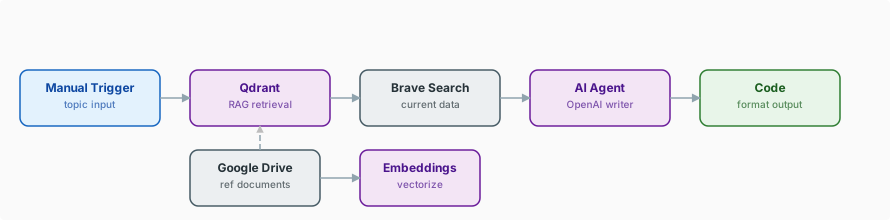
Triggers
AI & RAG
Research & Tools
Data & Storage
Topic Selection -- The workflow reads the next unprocessed topic from a Google Sheets content queue. Each row contains the video topic, target audience notes, key points to cover, and any specific research directions.
Document Ingestion (First Run) -- On initial setup, Google Drive documents are loaded, split by the Token Splitter into manageable chunks, embedded via OpenAI Embeddings, and stored in Qdrant. This creates the style library that powers all future script generation. New documents can be added at any time.
RAG Context Retrieval -- The topic and key points are converted to embeddings and used to query Qdrant. The vector store returns the most relevant chunks from your reference materials -- past script sections that match the current topic's style, structure, or subject matter.
Web Research -- Brave Search queries are constructed from the topic to gather current information, statistics, expert quotes, and trending perspectives. This ensures the script includes timely, accurate content rather than stale training data.
Script Generation -- The AI Agent receives the topic brief, the RAG context (style examples), and the web research results. It generates a complete YouTube script following the structural patterns from the reference materials: hook, intro, main sections, transitions, call to action, and outro.
Script Formatting -- A Code node formats the raw AI output into a clean script format with section headers, timing estimates, camera direction notes, and B-roll suggestions. The formatting follows conventions established in the reference materials.
Output Storage -- The completed script is written to Google Sheets with metadata including the topic, generation date, word count, estimated video length, and the source references used. A copy is also saved to Google Drive for archive purposes.
RAG-powered style consistency. The Qdrant knowledge base does not just store facts -- it stores your creative style. By ingesting your best-performing scripts, the AI agent learns your voice, pacing, vocabulary, and structural preferences. New scripts sound like you, not like generic AI output.
Brave Search for current content. Scripts about current topics need current information. Brave Search provides real-time data that the AI's training data cannot -- recent statistics, current events, new research findings. This keeps scripts relevant and accurate.
Standalone deployment. Unlike our larger multi-workflow scriptwriting systems, this workflow runs independently. No sub-workflow dependencies, no shared databases to configure, no complex orchestration. Install it, ingest your documents, and start generating scripts.
Tip: Key Techniques
Style Library via RAG -- Ingest your best-performing content as reference documents in a vector store. When the AI generates new content, it retrieves relevant examples of your style rather than relying on generic patterns. This is the most effective technique for maintaining voice consistency in AI-generated content.
Token Splitter for Document Ingestion -- Large documents must be split into appropriately sized chunks before embedding. Too large and retrieval becomes noisy; too small and context is lost. The Token Splitter handles this balance automatically, producing chunks that are meaningful enough for RAG retrieval.
Separation of Ingestion and Generation -- Keep document ingestion (building the knowledge base) and script generation (using the knowledge base) as separate execution paths. This way, you ingest documents once and generate scripts many times without re-processing your entire reference library on every run.
The workflow.json file in this folder can be imported directly into your n8n instance via Settings > Import Workflow.
This build ships with its complete n8n workflow. Download the workflow JSON, then import it in n8n with Workflows, Import from file, and add your own credentials before the first run.
KEEP LEARNING
The Workflow Engineer connects individual n8n concepts to testing, deployment and running a complete workflow.
APPLY IT TO YOUR SYSTEM
Bring the process, the tools involved and an example of where the current workflow gets stuck.