The YouTube Scriptwriter is a 43-node n8n workflow that pairs document-ingestion RAG with AI scriptwriting to write in a specific creator's voice. One mode ingests reference documents into a Qdrant vector store; the other takes a topic and has an Anthropic-powered AI Agent draft the script, drawing style from Google Sheets libraries of hooks, linking phrases, and narrative patterns.
What is the YouTube Scriptwriter workflow?
A focused 43-node workflow that combines document-ingestion RAG with AI scriptwriting and a distinctive approach to consistent voice: Google Sheets as style libraries. Rather than hoping an AI model maintains a consistent tone across scripts, this workflow feeds the agent structured libraries of hooks, linking phrases, and narrative progression patterns pulled directly from spreadsheets. The result is an AI scriptwriter that writes like a specific creator, not a generic chatbot.
| Nodes |
Category |
Complexity |
Key Integrations |
| 43 |
Content Creation & AI |
Intermediate |
Google Drive, Qdrant, Cohere, Anthropic, OpenAI, Brave Search, Redis Memory |
What do you need to run it?
- Anthropic API key (primary LLM for the AI Agent scriptwriter)
- OpenAI API key (supporting AI tasks)
- Qdrant instance (cloud or self-hosted) for the RAG knowledge base
- Cohere API key for embedding generation during document ingestion
- Brave Search API key for real-time web research during script generation
- Redis instance (cloud or self-hosted) for session memory across writing stages
- Google Drive OAuth2 credentials for reference document retrieval
- Google Sheets OAuth2 credentials for style libraries (Hook Library, Linking Phrases, Narrative Progression) and script output
- Mistral API key for OCR text extraction via HTTP Request
- Knowledge level: Intermediate -- requires understanding of RAG pipelines, vector databases, and dual-mode workflow design
How long does setup take?
45-60 minutes including Qdrant setup, Redis configuration, style library spreadsheet creation, reference document ingestion, and credential wiring.
What does the workflow do?
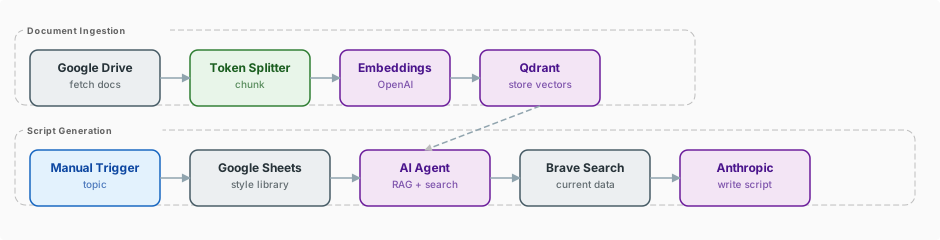
The workflow operates in two modes. The first mode is document ingestion: reference documents (PDFs, articles, notes) are pulled from Google Drive, processed through Mistral OCR via HTTP Request for text extraction, chunked, embedded using Cohere, and stored in the Qdrant vector store. This builds the knowledge base that the AI agent draws from when writing scripts. You run this mode whenever you have new reference material to add.
The second mode is script generation. You provide a topic, and the AI Agent -- powered by Anthropic Claude -- retrieves relevant context from Qdrant, searches the web via Brave Search for current information, and then writes the script. What makes this workflow distinctive is how it handles writing style. Three Google Sheets serve as AI "style libraries": a Hook Library containing proven opening patterns, a Linking Phrases sheet with transition language that matches the creator's voice, and a Narrative Progression sheet defining how the creator typically structures arguments and stories.
The AI Agent accesses these sheets as tools during generation. Rather than relying on vague prompt instructions like "write in a conversational tone," the agent has concrete examples of the creator's actual language patterns. Redis Memory maintains context across the writing session, allowing the agent to reference earlier sections of the script as it writes later ones. The finished script is output to Google Sheets with section markers and timing estimates.
What does the workflow look like?
Which nodes does it use?
Triggers
AI & Language Models
- AI Agent
- Anthropic
- OpenAI
- Qdrant Vector Store
- Cohere Embeddings
- Redis Memory
Data & Integrations
- Google Drive
- HTTP Request (Mistral OCR)
- Brave Search
- Google Sheets (incl. Tool Access)
- Code
How does the workflow flow step by step?
- Ingestion Mode: Manual Trigger starts document ingestion from a specified Google Drive folder.
- Google Drive retrieves reference documents (PDFs, articles, notes).
- Mistral OCR (HTTP Request) extracts and cleans text from the documents.
- Cohere Embeddings generates vectors for each document chunk.
- Qdrant stores the embedded chunks, building the knowledge base.
- Generation Mode: Manual Trigger accepts a topic and initiates script generation.
- AI Agent (Anthropic Claude) receives the topic and begins script construction.
- Qdrant retrieval provides relevant context from the ingested knowledge base.
- Brave Search supplies current web information for freshness and supporting data.
- Google Sheets tools deliver style libraries: Hook Library, Linking Phrases, and Narrative Progression patterns.
- Redis Memory maintains context across the writing session as the agent builds section by section.
- Google Sheets output receives the completed script with section markers and timing estimates.
What makes this workflow distinctive?
- Google Sheets as style libraries. This is the standout technique. Instead of prompt-engineering voice and tone, the workflow gives the AI agent access to curated libraries of the creator's actual language patterns: hooks that have worked, linking phrases that sound natural, and narrative structures that define the creator's style.
- Full RAG pipeline. The ingestion mode builds a growing knowledge base from reference documents, ensuring scripts are grounded in specific, curated information rather than generic LLM knowledge.
- Brave Search for freshness. Real-time web search ensures scripts include current data and recent developments, not just information from the training data cutoff.
- Dual-mode design. The clean separation between ingestion and generation modes means the knowledge base can be maintained independently of script production.
How much does it cost to run?
- Anthropic Claude: Primary model for script generation; ~$0.50-2.00 per script depending on length and context retrieved
- OpenAI: Supporting role; minimal per-script cost
- Cohere: Embedding cost during document ingestion is one-time per document; very low ongoing cost
- Brave Search: Free tier (2,000 requests/month); paid plans from $5/month
- Qdrant Cloud: Free tier (1GB) sufficient for moderate knowledge bases
- Redis Cloud: Free tier (30MB) sufficient for session memory
- Mistral OCR: Minimal per-document cost during ingestion
- Google Drive & Sheets: Free with Google account
- Estimated cost per script: $0.75-3.00 in API costs
Who is this workflow for?
- Professional YouTubers who need to maintain a consistent voice across many videos
- Video production agencies writing scripts that must match a client's established brand voice
- Content teams where multiple writers need to produce scripts in a single creator's style
- Solo creators who want AI assistance without losing their distinctive voice
Tip: Key Techniques Used in This Workflow.
- Google Sheets as AI tools -- Providing Google Sheets as callable tools to an AI Agent is a powerful pattern for injecting structured, editable knowledge into AI workflows. The creator can update their style libraries at any time, immediately changing how the AI writes.
- Document ingestion pipeline -- The Google Drive to Mistral OCR to Cohere to Qdrant pipeline is a reusable pattern for building RAG-ready knowledge bases from document collections.
- Brave Search integration -- Adding real-time web search to a RAG-equipped agent gives it both deep (vector store) and fresh (web) context.
- Redis session memory -- Maintaining context across a multi-section writing task ensures coherent long-form output where later sections build on earlier ones.
- Dual-mode workflows -- Separating ingestion from generation within a single workflow file keeps related logic together while allowing independent execution of each mode.
How do you download and import the workflow?
The workflow.json file in this folder can be imported directly into your n8n instance via Settings > Import Workflow.
This build ships with its complete n8n workflow. Download the workflow JSON, then import it in n8n with Workflows, Import from file, and add your own credentials before the first run.