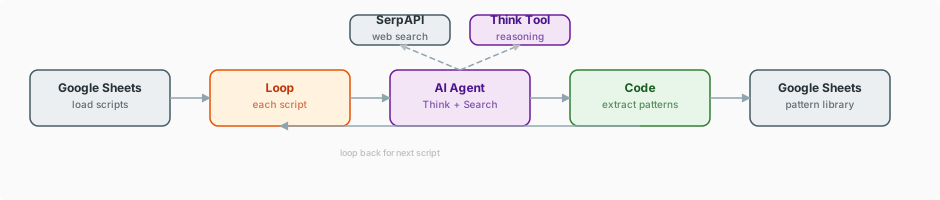
This is a 12-node workflow that reads YouTube scripts from Google Sheets, loops through each one, and sends it to an AI Agent equipped with SerpAPI web search and a Think reasoning tool. The agent extracts content patterns, benchmarks them against similar content, and appends a structured pattern report back to the sheet, pausing between iterations to respect API rate limits.
What does this workflow do?
A clean, elegant 12-node workflow that proves you do not need hundreds of nodes to do serious AI work. This workflow reads YouTube scripts from Google Sheets, loops through each one, and sends it to an AI Agent equipped with SerpAPI web search and a "Think" reasoning tool for chain-of-thought analysis. The agent extracts actionable content patterns -- what works, what does not, and why -- then appends the results back to the sheet. It is surgical, efficient, and immediately useful.
| Nodes |
Category |
Complexity |
Key Integrations |
| 12 |
Content Creation & AI |
Intermediate |
OpenAI, SerpAPI, Google Sheets, Think Tool |
How does the agent analyze each script?
The workflow starts by reading a batch of YouTube scripts from a Google Sheets document. Each script enters a loop where it is processed individually by an AI Agent. The agent has two tools at its disposal: SerpAPI for real-time web search (to research similar content and pull benchmarking data) and a Think Tool that enables structured chain-of-thought reasoning before producing output.
For each script, the agent performs a multi-step analysis. First, it uses the Think Tool to reason through the script's structure: how the hook is constructed, how arguments are sequenced, where transitions occur, what rhetorical devices are employed, and how the conclusion drives action. Then it searches the web via SerpAPI to compare these patterns against high-performing content in the same niche. The agent produces a structured pattern report that includes identified patterns, effectiveness assessments, comparison benchmarks, and specific recommendations.
A Wait node manages pacing between iterations to respect API rate limits. Results are appended to Google Sheets as structured pattern analyses, building a growing library of content intelligence that compounds over time. After processing all scripts, the loop completes and the workflow finishes cleanly.
What do you need to run it, and how long does setup take?
- OpenAI API key for AI Agent analysis with Think tool
- SerpAPI API key for web search benchmarking
- Google Sheets OAuth2 credentials for script input and pattern analysis output
- YouTube scripts pre-loaded in a Google Sheets document for analysis
- Knowledge level: Intermediate -- requires basic understanding of AI agents and Google Sheets integration
15-20 minutes including API credential setup, Google Sheets preparation with script data, and agent configuration.
What does the workflow look like?
Which nodes does it use?
Triggers
AI & Language Models
- AI Agent
- OpenAI
- Simple Memory
- Think Tool
Data & Integrations
- Google Sheets (3)
- SerpAPI
- Loop / SplitInBatches
- Code
- Wait
How does the workflow run, step by step?
- Manual Trigger starts the workflow.
- Google Sheets reads a batch of YouTube scripts from the specified spreadsheet.
- Loop (SplitInBatches) takes the first unprocessed script.
- Code node prepares the script data and formats the analysis prompt for the AI Agent.
- AI Agent (OpenAI) receives the script and begins analysis.
- Think Tool enables the agent to reason step by step through the script's structure before producing conclusions.
- SerpAPI runs web searches to pull benchmarking data and compare patterns against high-performing content in the same niche.
- Simple Memory stores context from the current analysis session.
- The agent produces a structured pattern report: identified patterns, effectiveness ratings, benchmarks, and recommendations.
- Google Sheets receives the pattern analysis, appended as a new row with structured columns.
- Wait node pauses for a configured interval to respect API rate limits.
- Loop returns to step 3 for the next script until all scripts are processed.
What makes this workflow different?
- Elegant simplicity. Twelve nodes. No sprawling complexity, no unnecessary orchestration. This workflow does one thing extraordinarily well, proving that the best automation is often the simplest.
- The Think Tool. This is one of the most underused capabilities in n8n's AI toolkit. It enables genuine chain-of-thought reasoning, allowing the agent to work through complex structural analysis step by step before committing to conclusions.
- SerpAPI for real-time benchmarking. The agent does not analyze scripts in a vacuum. It searches the web for comparable content, grounding its pattern analysis in real competitive data rather than abstract AI opinions.
- Compounding intelligence. Each execution adds structured pattern data to Google Sheets. Over time, this builds a comprehensive library of content intelligence that becomes increasingly valuable.
How much does it cost to run?
- OpenAI: ~$0.05-0.15 per script analysis depending on script length and Think tool reasoning depth
- SerpAPI: 1-3 searches per script; free tier includes 100 searches/month. Paid plans from $50/month
- Google Sheets: Free with Google account
- Estimated cost per batch: $0.50-2.00 for analyzing 10 scripts
Who is this workflow for?
- Content strategists who need systematic analysis of what makes content perform
- Competitive analysts studying successful creators in a niche
- Marketing teams developing data-driven content playbooks
- Solo creators who want objective analysis of their own scripts and competitors' approaches
What key techniques does it demonstrate?
Tip: Key Techniques Used in This Workflow
- The Think Tool -- Giving an AI Agent a "Think" tool enables it to perform structured reasoning before producing output. This is particularly valuable for analytical tasks where step-by-step reasoning produces better conclusions than direct answering.
- SerpAPI as an agent tool -- Providing web search as a callable tool (rather than pre-fetching results) lets the agent decide what to search for based on what it finds in each script, making research contextually adaptive.
- Rate-limited loops -- The Wait node between iterations is a simple but critical pattern for any workflow that makes external API calls in a loop. Without it, you hit rate limits and the workflow fails.
- Google Sheets as both input and output -- Using the same tool for reading scripts and writing results keeps the data pipeline clean and makes results immediately accessible alongside source material.
- Minimal viable architecture -- This workflow demonstrates that not every problem needs a 200-node solution. Identifying the minimum set of nodes that solves the problem well is itself a skill.
How do you download and import the workflow?
The workflow.json file in this folder can be imported directly into your n8n instance via Settings > Import Workflow.
This build ships with its complete n8n workflow. Download the workflow JSON, then import it in n8n with Workflows, Import from file, and add your own credentials before the first run.