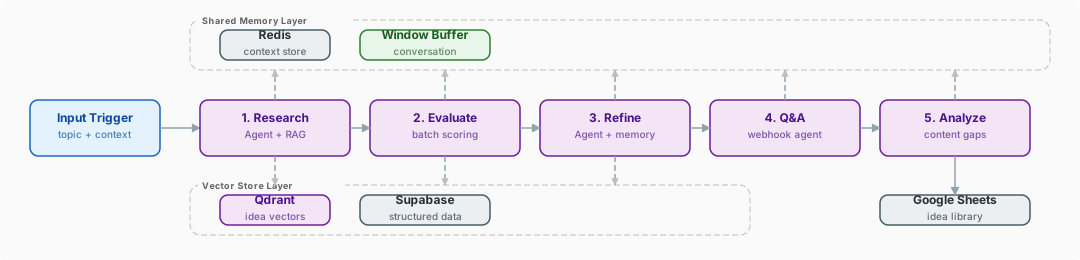
This 94-node system runs five specialized AI agents as a content-ideation pipeline for YouTube. A Research Agent pulls context from a Qdrant vector store and generates raw ideas; an Evaluation Agent scores them; a Refinement Agent sharpens the survivors; a webhook Q&A Agent answers follow-ups; and an Analysis Agent checks ideas against the creator's existing library. Redis Memory shares context across all five.
What does the YouTube Idea Factory do?
A 94-node, 5-agent AI system built for relentless content ideation. This workflow does not generate one idea at a time -- it runs a structured pipeline of specialized AI agents, each with a distinct role, persistent memory, and access to external knowledge through RAG. The result is a factory-line approach to YouTube content planning that produces researched, evaluated, and refined ideas ready for production.
| Nodes |
Category |
Complexity |
Key Integrations |
| 94 |
Content Creation & AI |
Advanced |
OpenAI, Anthropic, Qdrant, Supabase, Redis Memory, Google Sheets |
The workflow operates through five specialized AI agents, each handling a discrete phase of the content ideation process. The Research Agent kicks things off by scanning a topic area, pulling relevant context from the Qdrant vector store, and generating a batch of raw content ideas grounded in real data and trending themes. These raw ideas then pass to the Batch Evaluation Agent, which scores each one against criteria like audience relevance, competition level, search demand, and production feasibility.
High-scoring ideas advance to the Refinement Agent, which sharpens the concept: tightening the angle, suggesting thumbnail approaches, drafting working titles, and outlining a preliminary content structure. The Q&A Agent is available via webhook for interactive follow-up -- you can ask questions about any idea and get context-aware answers backed by the vector store. Finally, the Content Analysis Agent reviews the refined ideas against the creator's existing content library (stored in Google Sheets) to flag overlap, identify gaps, and suggest strategic positioning.
Redis Memory nodes maintain conversational context across all five agents within a single execution. This means the Refinement Agent knows what the Evaluation Agent scored highly and why, and the Analysis Agent can reference decisions made earlier in the pipeline. Scheduled batch processes keep the vector stores fresh with new data on a regular cadence.
- Five specialized agents. Each agent has a single, well-defined responsibility. This division of labor produces better results than a single monolithic prompt because each agent can be independently tuned and debugged.
- Persistent memory across agents. Redis Memory nodes create a shared context layer. The Refinement Agent knows exactly why the Evaluation Agent scored an idea highly, enabling coherent multi-stage reasoning.
- Dual vector stores. Qdrant handles curated reference knowledge while Supabase stores dynamic content like trending topics and recent data, giving agents access to both stable and fresh context.
- Interactive webhook Q&A. The pipeline is not just a batch job -- the webhook-triggered Q&A Agent allows real-time, conversational exploration of generated ideas, making this a tool you interact with rather than just run.
How does the workflow work?
Triggers
- Manual Trigger
- Schedule Trigger
- Webhook Trigger
AI & Language Models
- AI Agent (5)
- OpenAI (10)
- Anthropic (2)
- Qdrant Vector Store (2)
- Cohere Embeddings (2)
- Supabase Vector Store
- Redis Memory (4)
Data & Integrations
- Google Sheets (8+)
- Google Drive
- Code
- Merge
- IF / Switch
- Manual or Schedule Trigger initiates the pipeline with a topic area or niche focus.
- Research Agent queries Qdrant for relevant prior ideas and trends, then generates a batch of raw content concepts using OpenAI.
- Batch Evaluation Agent scores each raw idea against audience relevance, competition, search demand, and production feasibility.
- Ideas are filtered -- only those above the scoring threshold advance to refinement.
- Refinement Agent sharpens each surviving idea: tightens the angle, drafts working titles, suggests thumbnail concepts, and outlines a preliminary structure.
- Redis Memory stores the full context chain so downstream agents understand upstream decisions.
- Q&A Agent (webhook-triggered) allows interactive follow-up questions about any idea, with context-aware responses from the vector store.
- Content Analysis Agent compares refined ideas against the creator's existing content library in Google Sheets.
- Gap analysis results identify overlap with existing content and surface underserved topic areas.
- Google Sheets receives the final rated, refined, and analyzed idea list with full metadata.
- Scheduled batch processes periodically refresh the vector stores with new trend data and content library updates.
Tip: Key Techniques Used in This Workflow
- Multi-agent specialization -- Five agents with distinct system prompts and tool access create a pipeline where each stage genuinely improves on the last.
- Redis-backed shared memory -- Multiple Redis Memory nodes with shared session keys allow agents to read each other's outputs and reasoning, enabling coherent multi-stage processing.
- Dual vector store architecture -- Qdrant for stable reference knowledge and Supabase for dynamic trend data give agents the right context at the right time.
- Webhook interactivity -- The Q&A Agent transforms a batch workflow into an interactive tool, demonstrating how n8n webhooks enable human-in-the-loop AI systems.
- Scheduled vector store refresh -- Background processes keep knowledge bases current without blocking the main ideation pipeline.
What do you need to run it, and what does it cost?
- OpenAI API key (10 nodes across multiple agents)
- Anthropic API key (2 nodes for select agents)
- Qdrant instance (cloud or self-hosted) -- 2 vector store collections for reference knowledge
- Cohere API key for embedding generation (2 embedding nodes)
- Supabase account with vector store extension enabled for dynamic trend data
- Redis instance (cloud or self-hosted) for shared agent memory (4 memory nodes)
- Google Sheets OAuth2 credentials for content library and output storage (8+ nodes)
- Google Drive OAuth2 credentials for document access
- Knowledge level: Advanced -- requires understanding of multi-agent AI systems, dual vector store architecture, Redis memory sharing, and webhook-triggered interactive workflows
60-90 minutes including Qdrant collection setup, Supabase vector configuration, Redis instance setup, and agent/webhook configuration.
- OpenAI: 10 nodes across 5 agents; estimate $1-5 per full ideation pipeline run depending on batch size
- Anthropic: 2 supporting nodes; ~$0.50-2.00 per run
- Qdrant Cloud: Free tier (1GB); 2 collections may require a paid tier for larger knowledge bases
- Cohere: Free trial tier available; low per-run embedding cost
- Supabase: Free tier includes vector store capabilities; paid plans from $25/month for higher usage
- Redis Cloud: Free tier (30MB) sufficient for session memory
- Google Sheets & Drive: Free with Google account
- Estimated cost per full pipeline run: $2-8 in API costs
Who is it for, and how do you import the workflow?
- YouTubers who need a steady pipeline of validated content ideas
- Content strategists managing multiple channels or creators
- Media agencies producing content calendars for clients at scale
- Brand content teams aligning video production with audience demand data
The workflow.json file in this folder can be imported directly into your n8n instance via Settings > Import Workflow.
This build ships with its complete n8n workflow. Download the workflow JSON, then import it in n8n with Workflows, Import from file, and add your own credentials before the first run.