KEEP LEARNING
Build the bigger picture.
The Workflow Engineer connects individual n8n concepts to testing, deployment and running a complete workflow.
Showcase > Ops & Monitoring
10-node n8n workflow using SSH, GPT-4 Mini, and Telegram for AI-powered VPS security monitoring with dual-severity alerts.
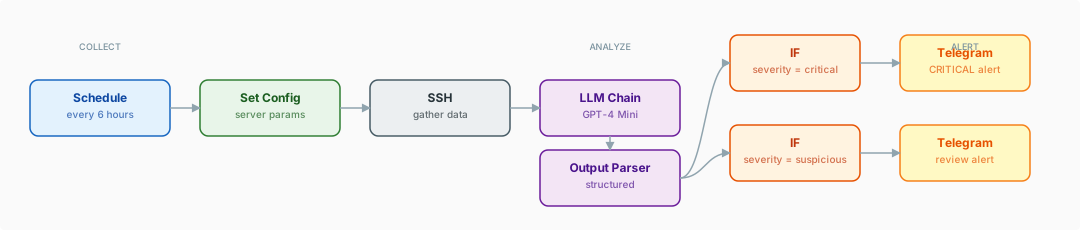
This is a 10-node security monitor that SSHes into a VPS every six hours, collects process, network, port, login, and resource data, and sends it to GPT-4 Mini for threat analysis. A Structured Output Parser returns a severity rating, and two IF nodes route malicious findings to an immediate Telegram alert and suspicious ones to a separate review channel.
A 10-node security monitoring system that SSH-es into your VPS every six hours, gathers process and network data, and uses GPT-4 Mini to detect threats that static rule engines miss. This is what happens when you combine traditional server monitoring with AI pattern recognition. The workflow does not just check if a port is open -- it analyzes the full context of what is running, what is connecting, and whether the behavior pattern matches known threat signatures. Dual-severity Telegram alerts ensure you hear about genuine threats immediately and review suspicious activity when it is convenient.
| Nodes | Category | Complexity | Key Integrations |
|---|---|---|---|
| 10 | DevOps / Security | Advanced | SSH, OpenAI (GPT-4 Mini), Telegram |
Every six hours, this workflow connects to your VPS via SSH and runs a series of system commands that capture running processes, active network connections, listening ports, recent login attempts, and resource utilization. The raw output is packaged and sent to GPT-4 Mini with a specialized security analysis prompt.
The AI evaluates the data against known threat patterns: cryptominers disguised as legitimate processes, unauthorized outbound connections, suspicious listening ports, brute force login attempts, and privilege escalation indicators. It returns a structured assessment with severity classification -- malicious, suspicious, or clean.
The dual-alert system is the key design decision. Confirmed malicious activity triggers an immediate Telegram alert with full details and recommended actions. Suspicious-but-unconfirmed activity goes to a separate Telegram channel for review during business hours. Clean reports are logged silently. This prevents alert fatigue while ensuring genuine threats get immediate attention.
ps, netstat/ss, auth.log, crontab)20-30 minutes including SSH credential configuration, Telegram bot setup with dual channels, and schedule trigger configuration.
Triggers
Configuration
Data Collection
AI & Analysis
Alerting
Schedule Trigger -- The workflow fires every six hours. This cadence balances timely detection with reasonable API costs. For higher-security environments, the interval can be reduced to hourly.
Server Configuration -- A Set node defines the target VPS connection parameters: hostname, SSH credentials reference, and which data collection commands to execute.
SSH Data Collection -- The SSH node connects to the VPS and executes a curated set of commands: process listing (ps aux), network connections (netstat or ss), listening ports, recent auth log entries, disk and memory usage, and crontab contents. The combined output forms the raw security snapshot.
AI Security Analysis -- The raw SSH output is sent to GPT-4 Mini via an LLM Chain with a detailed security analysis prompt. The prompt instructs the AI to evaluate each data category against specific threat indicators: unknown processes with high CPU usage, unexpected outbound connections to foreign IPs, unauthorized listening ports, brute force login patterns, and suspicious cron entries.
Structured Output -- The Structured Output Parser enforces a consistent response format: overall severity level (clean, suspicious, malicious), list of flagged items with individual severity ratings, detailed analysis for each finding, and recommended remediation actions.
Severity Branching -- Two IF nodes evaluate the severity classification. Malicious findings take the critical alert path. Suspicious findings take the review alert path. Clean reports exit silently without generating notifications.
Dual Telegram Alerts -- Malicious findings send an immediate, detailed alert to a high-priority Telegram channel or direct message. Suspicious findings send a less urgent notification to a review channel. Each alert includes the full analysis, specific findings, and recommended actions.
SSH-based server monitoring. This workflow does not rely on installed agents or third-party monitoring services. It connects directly via SSH, runs standard Linux commands, and analyzes the output. No software to install on the server, no agents to maintain, no vendor lock-in.
AI-powered threat detection. Static rule-based monitoring catches known signatures. AI analysis catches patterns -- a combination of individually benign indicators that together suggest compromise. GPT-4 Mini provides this contextual analysis at a fraction of GPT-4's cost, making frequent monitoring economically viable.
Dual severity alerting. Alert fatigue kills security monitoring. By separating confirmed threats (immediate Telegram alert) from suspicious activity (review queue), this workflow ensures that critical alerts always get attention while lower-confidence findings are still captured for review.
Warning: Security Note
Store SSH credentials using n8n's built-in credential management. Never hardcode SSH keys or passwords in workflow nodes. Ensure your n8n instance itself is properly secured, as it will hold access credentials for your production servers.
Tip: Key Techniques
SSH as Data Collection Layer -- Using SSH commands instead of installed agents means zero footprint on the monitored server. This is ideal for environments where you cannot or prefer not to install additional software. Standard Linux commands provide all the data needed for comprehensive security analysis.
GPT-4 Mini for Cost-Effective Analysis -- Security monitoring runs frequently, so API costs matter. GPT-4 Mini provides sufficient reasoning capability for pattern recognition at a fraction of GPT-4's cost. Reserve GPT-4 for complex investigations; use Mini for routine monitoring.
Dual-Channel Alerting -- Separate your alert channels by severity. Critical alerts go to a channel with push notifications enabled. Suspicious findings go to a channel checked during business hours. This prevents the alert fatigue that causes teams to ignore monitoring entirely.
The workflow.json file in this folder can be imported directly into your n8n instance via Settings > Import Workflow.
This build ships with its complete n8n workflow. Download the workflow JSON, then import it in n8n with Workflows, Import from file, and add your own credentials before the first run.
KEEP LEARNING
The Workflow Engineer connects individual n8n concepts to testing, deployment and running a complete workflow.
APPLY IT TO YOUR SYSTEM
Bring the process, the tools involved and an example of where the current workflow gets stuck.