The One-Click Online Course Creator is a 225-node automation that generates a complete, publish-ready online course from a single topic input. From one subject, it produces a structured outline, writes every lesson with RAG-retrieved context from a Qdrant vector store, generates quizzes for each module, and uploads everything to Thinkific through its API -- ending as a live course students can enroll in.
| Nodes |
Category |
Complexity |
Key Integrations |
| 225 |
Content Creation & AI |
Expert |
Mistral, OpenAI, Anthropic, Qdrant, Cohere, Thinkific API, Slack, Google Sheets |
What do you need to run it?
- Mistral API key (primary LLM -- 15 nodes across the pipeline)
- OpenAI API key (supporting AI agent tasks)
- Anthropic API key (supporting AI agent tasks)
- Qdrant instance (cloud or self-hosted) for RAG-powered lesson writing
- Cohere API key for embedding generation
- Thinkific API key (requires a paid Thinkific plan with API access)
- Slack workspace with a configured bot token (for 5 progress notification nodes)
- Google Sheets OAuth2 credentials for outline storage and audit logging
- Knowledge level: Expert -- requires understanding of multi-agent orchestration, RAG pipelines, vector databases, and external platform API integration
How long does setup take?
90-120 minutes including Thinkific API configuration, Qdrant setup, Slack bot creation, and credential wiring across the 225-node workflow.
What does it do?
The workflow begins at a Manual Trigger where you provide just one input: the course topic. From that single string, an AI Agent powered by Mistral -- the primary LLM across the pipeline (15 nodes) -- generates a comprehensive course outline: modules, lessons, learning objectives, and a logical progression from beginner concepts to advanced material. The outline is validated by a second agent and written to Google Sheets for transparency and manual override if needed.
With the outline locked, the system enters its lesson-writing loop. For each lesson in the outline, a RAG-powered AI Agent queries the Qdrant vector store (populated with relevant reference material via Cohere embeddings) to retrieve supporting context. The Mistral-driven agent then writes the full lesson content using structured output formatting: introduction, core content sections, key takeaways, and transition text to the next lesson. A separate agent generates quiz questions for each module, including answer explanations. Slack notifications (5 nodes) keep stakeholders informed of progress throughout the generation pipeline.
The final stage handles platform delivery. HTTP Request nodes interact with the Thinkific API to create the course shell, populate chapters, upload lesson content, attach quizzes, and configure course settings. What starts as a single topic string ends as a live course on Thinkific that students can purchase and take immediately.
What does the workflow look like?
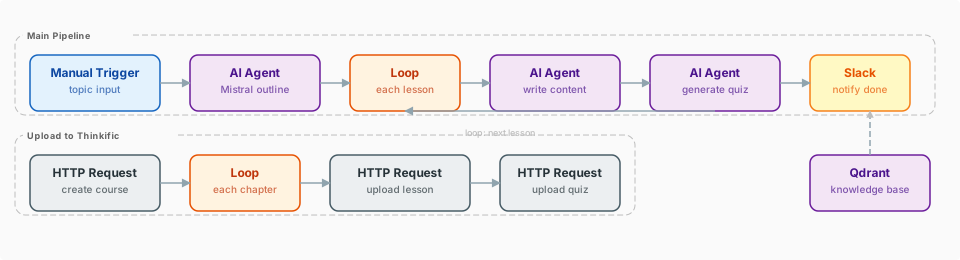
What nodes does it use?
Triggers
AI & Language Models
- AI Agent (10+)
- Mistral (15)
- OpenAI (1)
- Anthropic
- Qdrant Vector Store
- Cohere Embeddings
Data & Integrations
- Google Sheets (8+)
- HTTP Request (Thinkific API)
- Slack (5)
- Code
- Merge
- Loop / SplitInBatches
- IF / Switch
How does the workflow run, step by step?
- Manual Trigger accepts the course topic as input.
- Outline Agent (Mistral) generates a structured course outline with modules, lessons, and learning objectives.
- Validation Agent reviews the outline for logical flow, completeness, and pedagogical structure.
- Google Sheets stores the approved outline, allowing manual adjustments before proceeding.
- Lesson Loop iterates over each lesson in the outline.
- RAG Retrieval (Qdrant + Cohere) pulls relevant reference material for the current lesson topic.
- Lesson Writer Agent produces full lesson content with structured formatting: intro, body sections, takeaways, and transitions.
- Quiz Generator Agent creates assessment questions for each module with answer explanations.
- Code nodes format all content into Thinkific-compatible structures.
- HTTP Request nodes call the Thinkific API to create the course, add chapters, upload lessons, and attach quizzes.
- Final Google Sheets update logs the published course URL and completion status.
What makes it different?
- True end-to-end automation. From a topic string to a live, purchasable course on Thinkific. No intermediate manual steps, no copy-pasting between tools, no formatting by hand.
- RAG-enhanced lesson quality. Each lesson is written with retrieved context from a curated knowledge base, producing content that goes beyond what an LLM generates from its training data alone.
- Structured output consistency. Every lesson follows the same pedagogical format, ensuring a professional and uniform student experience across all modules.
- Platform-native delivery. The Thinkific API integration means the course is not just a document -- it is a properly structured product with chapters, lessons, quizzes, and settings ready for enrollment.
What does it cost to run?
- Mistral: Primary model across 15 nodes; estimate $2-8 per full course generation depending on lesson count
- OpenAI: Supporting role; ~$0.50-2.00 per course
- Anthropic: Supporting role; ~$0.50-2.00 per course
- Qdrant Cloud: Free tier (1GB) sufficient for most courses; paid tiers for larger knowledge bases
- Cohere: Free trial tier available; production embeddings are low-cost per course
- Thinkific: Requires paid plan ($49+/month) for API access; no per-API-call fees
- Slack: Free for notifications
- Total estimated cost per course: $5-15 in AI API costs depending on course length and complexity
Who is it for?
- Course creators who want to launch products faster without sacrificing quality
- Educators building supplementary material for existing curricula
- Coaches and consultants packaging their expertise into scalable digital products
- Knowledge businesses that need to produce high volumes of educational content
What key techniques does it use?
- Structured output formatting -- AI agents use strict output schemas to ensure lesson content is consistently formatted, making downstream processing reliable.
- Looped content generation -- The SplitInBatches pattern processes each lesson independently while maintaining access to the full course outline for context.
- RAG for content depth -- Qdrant retrieval augments AI generation with specific, curated reference material, moving beyond generic LLM outputs.
- API-first platform delivery -- HTTP Request nodes manage the full Thinkific course lifecycle through their API, demonstrating advanced external platform integration.
- Multi-agent validation -- Separate agents handle generation and validation, catching structural issues before content enters the production pipeline.
How do you import the workflow?
The workflow.json file in this folder can be imported directly into your n8n instance via Settings > Import Workflow.
Where do you download the workflow JSON?
This build ships with its complete n8n workflow. Download the workflow JSON, then import it in n8n with Workflows, Import from file, and add your own credentials before the first run.