This 162-node workflow turns existing video subtitle (SRT) files into fully structured online courses on Thinkific. It pulls SRT files from Google Drive, cleans them with Mistral OCR, then uses AI agents to restructure the transcript into topic-based prose, split it into chapters, polish each lesson, and generate quizzes -- repurposing recorded content with no re-recording or manual transcription cleanup.
What does the SRT course-creator workflow do?
A 162-node workflow that takes existing video subtitle files and transforms them into fully structured online courses. If you have recorded video content sitting on a drive somewhere -- webinars, lectures, tutorials, conference talks -- this workflow extracts the knowledge from those SRT files and repackages it into a professional course on Thinkific. No re-recording. No manual transcription cleanup. Just automated content repurposing at its most practical.
| Nodes |
Category |
Complexity |
Key Integrations |
| 162 |
Content Creation & AI |
Advanced |
Google Drive, Mistral OCR, OpenAI, Anthropic, Qdrant, Thinkific API |
The pipeline starts by pulling SRT files from Google Drive. These raw subtitle files are messy by nature -- fragmented sentences, timestamp artifacts, speaker label inconsistencies. The first processing stage uses Mistral OCR (via HTTP Request) to clean and normalize the text, then AI agents restructure the raw transcript into coherent prose organized by topic rather than by timestamp.
Once the content is restructured, a chapter-splitting agent analyzes the material for natural breakpoints: topic shifts, conceptual boundaries, and logical progression markers. Each chapter becomes a lesson candidate. A polishing agent then rewrites each chapter into proper lesson format with introductions, structured body content, key takeaways, and smooth transitions. Simultaneously, a quiz generation agent creates assessment questions anchored to the specific content of each lesson.
The Qdrant vector store plays a supporting role throughout, storing previously processed content that the AI agents can reference for consistency and to avoid repetition across lessons. The final stage pushes everything to Thinkific via HTTP API calls -- creating the course, building the chapter structure, uploading lesson content, and attaching quizzes.
What do you need to set it up?
- Google Drive OAuth2 credentials for SRT file retrieval
- Mistral API key for OCR text cleaning (called via HTTP Request)
- OpenAI API key for AI agent processing
- Anthropic API key for AI agent processing
- Qdrant instance (cloud or self-hosted) for cross-lesson reference embeddings
- Cohere API key for embedding generation
- Thinkific API key (paid Thinkific plan required for API access)
- Google Sheets OAuth2 credentials for content logging and audit
- Source SRT files uploaded to a Google Drive folder
- Knowledge level: Advanced -- requires understanding of multi-agent pipelines, vector databases, and external API integration
90-120 minutes including Thinkific API setup, Qdrant initialization, credential connections, and SRT file organization in Google Drive.
How does the workflow work step by step?
Triggers
AI & Language Models
- AI Agent (8+)
- OpenAI
- Anthropic
- Qdrant Vector Store
- Cohere Embeddings
Data & Integrations
- Google Drive
- HTTP Request (Mistral OCR)
- HTTP Request (Thinkific API)
- Google Sheets
- Code
- Loop / SplitInBatches
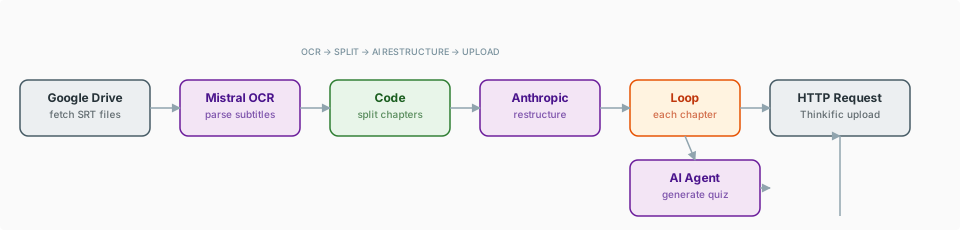
- Manual Trigger starts the workflow with a reference to the source video folder in Google Drive.
- Google Drive node retrieves all SRT files from the specified folder.
- Mistral OCR (via HTTP Request) cleans the raw subtitle text, removing timestamp artifacts and normalizing formatting.
- Restructure Agent reorganizes the cleaned text from timestamp-ordered fragments into coherent, topic-organized prose.
- Chapter Splitting Agent identifies natural content boundaries and divides the material into discrete lesson units.
- Qdrant stores each chapter's content as embeddings for cross-reference during lesson polishing.
- Lesson Polish Agent rewrites each chapter into structured lesson format with introductions, body sections, and takeaways.
- Quiz Generation Agent creates module-specific assessment questions based on each lesson's content.
- Google Sheets logs all generated content for review and audit tracking.
- HTTP Request nodes push the complete course structure to Thinkific: course creation, chapter setup, lesson upload, and quiz attachment.
Tip: Key Techniques Used in This Workflow
- OCR preprocessing -- Mistral OCR via HTTP Request cleans raw SRT data before AI processing, demonstrating effective use of external APIs for data preparation.
- Content restructuring agents -- AI agents that reorganize rather than just summarize, transforming time-ordered fragments into topic-organized prose.
- Chapter boundary detection -- AI analysis identifies natural breakpoints in continuous content, a technique applicable to any long-form content processing.
- Cross-lesson RAG -- The vector store maintains awareness of previously generated content, preventing repetition and ensuring progressive complexity.
- Multi-stage content pipeline -- Each processing stage has a clear, single responsibility, making the workflow debuggable and each stage independently testable.
What makes it different, what does it cost, and who is it for?
- Content repurposing at scale. Existing video content is an underutilized asset for most businesses. This workflow unlocks the educational value trapped in SRT files without requiring any new recording.
- Intelligent restructuring. The AI does not simply clean up subtitles -- it reorganizes fragmented, time-stamped text into logically structured educational content. This is a non-trivial transformation.
- OCR-first pipeline. Using Mistral OCR as the first processing step ensures clean input data regardless of SRT formatting inconsistencies.
- RAG-powered consistency. The Qdrant vector store ensures that later lessons reference and build upon concepts introduced in earlier ones, maintaining pedagogical coherence.
- Mistral OCR: Pay-per-use via API; SRT files are small so cost is minimal (~$0.01-0.05 per file)
- OpenAI: Multiple agent calls per lesson; estimate $1-5 per course depending on lesson count and length
- Anthropic: Used alongside OpenAI for processing; similar per-course cost range
- Qdrant Cloud: Free tier (1GB) is sufficient for most course projects
- Cohere: Free trial tier available; production embeddings are low-cost
- Thinkific: Requires a paid plan ($49+/month) for API access; the workflow itself does not incur Thinkific API fees
- Google Drive & Sheets: Free with Google account
- YouTubers looking to monetize their back catalog as online courses
- Training departments converting recorded sessions into structured learning paths
- Webinar hosts repurposing live event recordings into evergreen course products
- Conference speakers packaging their talks into sellable educational content
The workflow.json file in this folder can be imported directly into your n8n instance via Settings > Import Workflow.
This build ships with its complete n8n workflow. Download the workflow JSON, then import it in n8n with Workflows, Import from file, and add your own credentials before the first run.