
Converting transcripts into publish-ready Webflow articles at scale requires more than basic automation. This guide walks through a 5-step framework covering volume diagnosis, pipeline architecture, quality controls with hallucination detection, error handling for batch operations, and publisher-level output optimization. Includes a comparison of manual, semi-automated, and fully engineered approaches, plus long-term debugging strategies that prevent pipeline drift.
Most transcript-to-Webflow workflows are built on hope. Hope that the AI formatted the HTML correctly. Hope that speaker labels didn't get scrambled. Hope that the rich text field accepted the paste without stripping every header tag. When you're publishing five articles a month, you can spot-check each one. When you're publishing fifty, hope stops being a strategy.
Google's AI-cited best practices point to using semantic HTML, optimizing image loading, and assigning distinct roles for content, editing, and publishing. That advice is sound, but it assumes your pipeline already works. The gap between a working demo and a pipeline that survives real volume is where most teams bleed time.
A scalable transcript-to-Webflow workflow needs five things most tutorials skip: quality controls that catch failures before publish, custom code for edge cases in non-standard transcripts, engineered error handling with retry logic, publisher-level output formatting, and long-term support for when things drift. Here is how to build each layer.
Before you touch a single automation node, work through these five diagnostic steps. Each one exposes a failure point that generic workflows ignore.
Count your monthly transcript volume honestly. Under five articles a month, manual formatting in Google Docs plus Webflow's slash commands works, tedious, but controllable. Between five and twenty, semi-automation with n8n and the Webflow node becomes worth the setup time. Above twenty, you need engineered infrastructure with quality gates.
Map your transcript types too. Clean, single-speaker dictation behaves differently than a four-person podcast with cross-talk. Multi-speaker transcripts need custom Python parsers that handle .srt files, extract readable text, and format speaker-labeled JSON, tools like pysrt or youtube-transcript-api do the heavy lifting. If your transcripts are non-standard, budget time for parsing logic before you even think about Webflow.
A pipeline has four stages: ingestion (where does the transcript come from?), structuring (how does it become an article?), formatting (how does it become clean HTML/Markdown?), and publishing (how does it land in Webflow?).
Webflow's CMS API supports granular publishing: you can create items as drafts, apply draft changes to live items, publish directly, schedule, or archive. Smart pipelines push everything to draft first. Review happens inside Webflow, not inside the automation tool. Content states, Published, Draft changes, Draft, Queued to publish, Scheduled, Archived, give you a safety net if you use them deliberately.
The critical architectural decision: never auto-publish. Always draft, always review. A pipeline that publishes directly is a pipeline that will eventually publish something embarrassing.
This is where most pipelines collapse. n8n's Webflow integration gives you 800+ integrations and custom code nodes for logic, but it has no built-in quality controls for content adjudication or drift detection. You have to build them yourself.
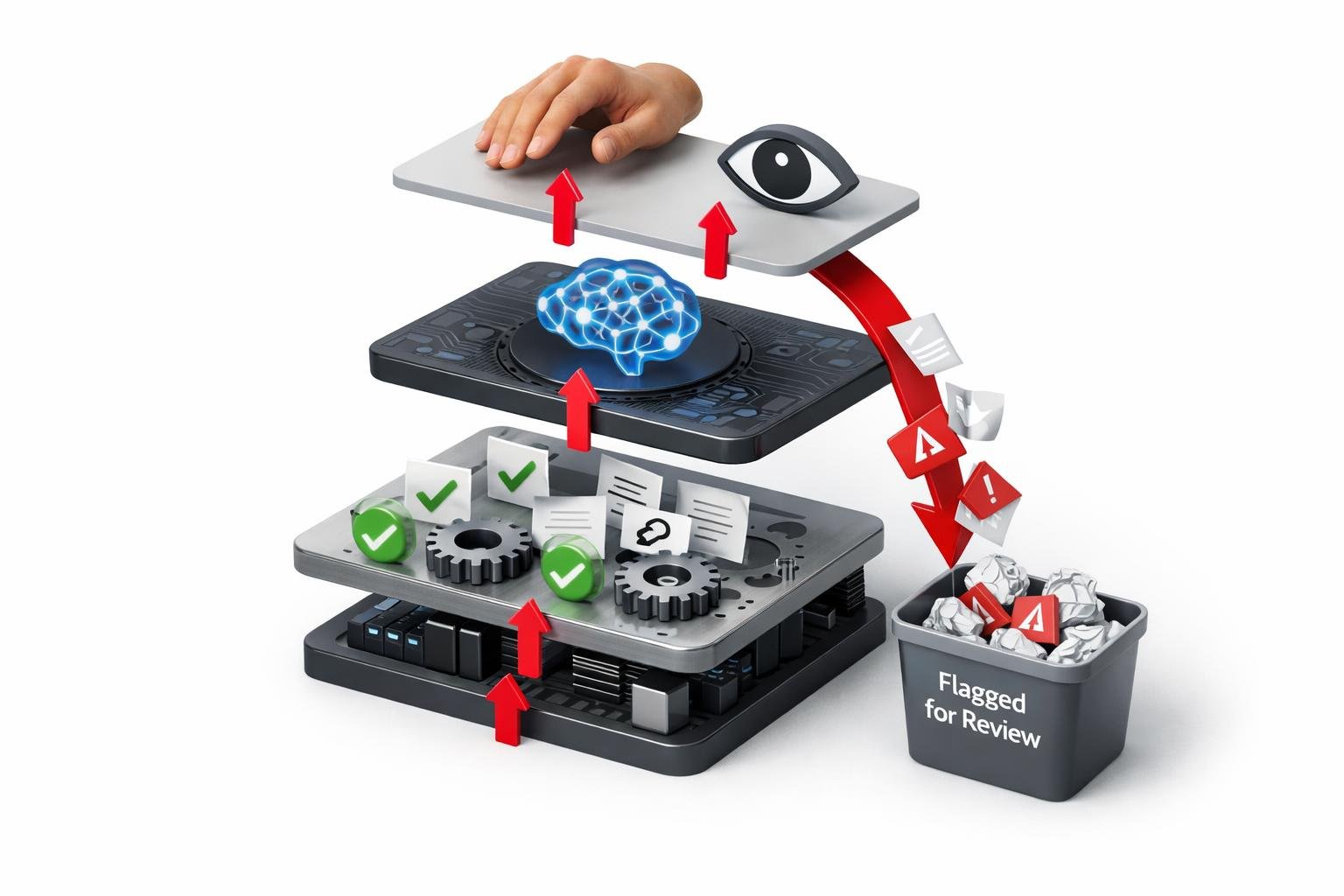
A production-grade quality layer needs three tiers. The Pebblous model is instructive: deterministic checks catch structural failures like missing H2s or broken links, an LLM-as-a-Judge evaluates accuracy and consistency, and exception-based human review handles what automated gates flag. Their NLI-based verifiers reduce hallucination by 45% (independently tested), and routing logic cuts verification costs by 80, 90%.
The three failure modes to gate for: hallucination (the AI invented a quote), context drift (the article veered off the transcript's actual topic), and structural inconsistency (headings don't nest, metadata is missing). Your pipeline should measure all three before any human sees the draft.
For teams that need these controls engineered rather than built from scratch, Hesham.us embeds adjudication thresholds, gating, and drift detection directly into the pipeline, not as an afterthought but as the backbone of every workflow.
The Webflow CMS API does not include built-in error handling, alerts, retries, or recovery protocols. If an API call fails mid-publish, your pipeline needs to know what failed, log it, retry with backoff, and alert a human if retries exhaust.
Batch processing is possible, Webflow supports it via Transifex APIs for entire collections, but batch operations amplify every error. One malformed rich text field in a batch of 30 articles can fail the entire batch or, worse, silently publish 29 correctly and leave one broken in draft. Your error handler needs per-item granularity.
n8n supports batch processing through workflow design rather than a dedicated batch API. That means you design the retry loops, the error queues, and the notification triggers. A custom code node checking HTTP response codes from Webflow's API, wrapped in a loop with exponential backoff, is the minimum viable error handler.
A transcript converted to plain paragraphs is not an article. Publisher-level outputs mean SEO metadata (title tags, meta descriptions, schema markup), accessibility (WCAG-compliant heading hierarchy, alt text generation), and formatting that matches your publication's style guide.
Custom Python parsers can extract readable text and handle timestamps, but they do not include built-in dynamic templating or SEO metadata generation. You need a templating layer, whether it's n8n custom code, an intermediate API, or a Cloudflare Worker, that maps transcript structure to article structure. Title from the first 60 seconds of discussion. H2s from topic shifts. Meta description from the core argument. All generated, all gated, all reviewable in draft.
| Dimension | Manual + Light Automation | Semi-Automated (n8n) | Fully Engineered Pipeline |
|---|---|---|---|
| Monthly volume | Under 5 articles | 5, 20 articles | 20+ articles |
| Transcript types | Clean, single-speaker | Single or dual-speaker | Multi-speaker, noisy, non-standard |
| Quality controls | Manual review only | Basic checks via custom code nodes | Three-tier: deterministic, LLM, human review |
| Error handling | None | Custom retry logic via n8n code nodes | Engineered: alerts, backoff, recovery, per-item logging |
| Publishing method | Manual paste into Webflow | Webflow API, draft-first | Batch publishing with staged rollout |
| SEO/accessibility | Manual | Templated (requires custom code) | Automated with verification gates |
| Long-term support | Self-managed | Self-managed | 12-month aftercare included with debugging |
| Setup complexity | Low | Medium | High (but designed for teams) |
For solo creators publishing a handful of articles monthly, the manual path is honest work. Transcribe with Descript or Otter, edit in Google Docs, convert to clean Markdown, and paste into Webflow's Rich Text Element. 3Scribe offers Webflow integration via Make if you want to skip the copy-paste step, though its batch processing capabilities are not publicly documented.
The catch: this doesn't scale. At six articles a month, formatting drift becomes visible. At ten, you're spending more time fixing formatting than writing.
Small teams benefit from n8n's 800+ integrations and custom code support. A trigger on new transcript upload to Google Drive fires a pipeline: parse the transcript, structure it with an LLM call, format as HTML, and push to Webflow as a draft via the CMS API. The custom code node handles logic that off-the-shelf integrations can't, multi-speaker labeling, timestamp stripping, metadata extraction.
The gap: n8n provides no built-in content quality controls. You build your own checks or you accept the risk. At 20 articles a month with human review on every draft, this is manageable. Above that, the review burden eats the time savings.
Publishers and high-volume content teams need infrastructure that semi-automation cannot provide. This is where custom middleware enters: Cloudflare Workers, custom APIs, and parsers that handle ingestion from any source, transform transcripts through templating engines, and push structured content to Webflow with quality gates at every stage.
The defining characteristic is that the pipeline self-polices. Adjudication thresholds and drift detection catch output degradation before human review. Error handling is not a code node with a try-catch, it's a system of alerts, retry queues, and recovery protocols. And when something does break, ongoing aftercare and debugging support means the pipeline gets fixed rather than abandoned.
The honest tradeoff: An engineered pipeline requires upfront investment in design and build. The return is not having to rebuild it six months later when volume exposes the shortcuts. For teams publishing at scale, that tradeoff compounds in your favor every publishing cycle.
Pipelines drift. AI model updates change output formatting. Webflow API versions deprecate endpoints. Transcript sources modify their export formats. Without monitoring, you discover these failures when an article publishes with broken formatting, or doesn't publish at all.
Your debugging layer needs three components. First, structured logging: every pipeline step writes its status, payload size, and response code. Second, drift alerts: if output formatting changes beyond a threshold, the pipeline flags the batch. Third, a recovery path: failed items retry automatically; exhausted retries route to a human with the full error context.
12 months of included aftercare, covering tech support, updates, debugging, and priority-one response, shifts this burden from your editorial team to the engineers who built the pipeline. For teams publishing daily, that is not a luxury. It is the difference between a pipeline that runs and one that keeps running.
::cta{019ef14b-d36f-751d-5b17-4caafe573345}
A transcript-to-Webflow workflow that scales is not a tool you buy. It is a system you engineer, with quality controls that catch hallucinations, error handlers that don't fail silently, and support that outlasts the build. Start with the five-step diagnosis. Choose the approach that matches your volume honestly. And if you need a pipeline built for scale rather than demo, get one engineered, not duct-taped.